 Fly Notes
Free dictation app for Mac that feeds your notebook
Download for Mac (Apple silicon)
Hold right Option, speak, and release. Your words land in the message, document or email you were writing. If you need the directions you gave someone last week, open Dictation and search for a word you remember.
Which words are worth keeping?
You might dictate “Come through the gate beside the bakery” into a delivery form a dozen times. Star that take once. Next time, search for bakery and copy the directions.
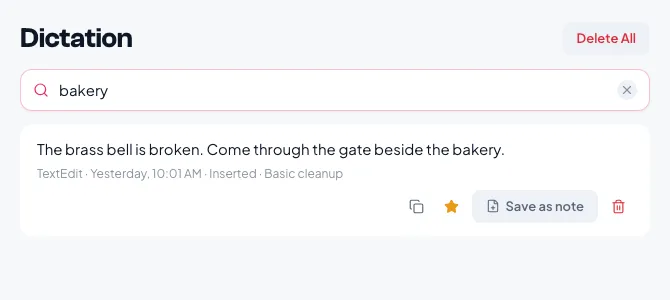
Save as note puts a take in your notebook. Save “Remind me to call the dentist tomorrow at 5 pm” and check the dated reminder there. Fly Notes sends the Mac notification while it is running, even with its window closed. Turn on Start at login in Settings ▸ Startup & Updates to keep it running. A take that stays in history is local to that Mac, outside the notebook that Ask can search. Where your dictations go
What do you need to download?
Fly Notes runs on Apple silicon Macs with macOS 11 or later. After installing the app, download the starter speech model (about 60 MB) and follow the Set up dictation card on the Dictation page. Microphone access lets Fly Notes hear you. Typing for you (Accessibility) lets it type in other apps. The Right ⌥ key (Input Monitoring) enables the single-key shortcut.
Speech recognition runs on your Mac. Basic cleanup removes common fillers and handles spoken punctuation in English, French, Spanish, Portuguese and German. Optional AI cleanup can use a separate local model (about 1.3 GB). If you choose a remote provider and supply your own key, the transcript goes directly to that provider. The recording stays on the Mac. Mac download and model details
Fly Notes Mac shortcuts
| What you want to do | Default shortcut |
|---|---|
| Dictate into the current app | Hold right Option (⌥), speak, then release. |
| Dictate while the single key is waiting for Input Monitoring | Option–Shift–Space (⌥⇧Space). The Dictation page shows the active shortcut. |
| Capture a voice note in the notebook | Option–Space (⌥Space). |
| Open the quick capture card | Control–Shift–Space (⌃⇧Space). |
Change the keys in Settings ▸ Shortcuts. Under Dictation shortcut, choose Hold to talk or Press to start and stop. Mac release notes
What is free?
Mac dictation, local history, saved notes and reminders work without an account, and dictation has no word limit. Fly Notes Pro adds notebook sync, more cloud voice-note minutes and a larger daily allowance for written answers in Ask. Pro is currently purchased on iPhone. With sync enabled on both devices, a saved note can travel with you. The original dictation history stays on the Mac. Fly Notes for iPhone and Apple Watch
Questions before you download
Does it work on an Intel Mac? No. Fly Notes for Mac needs Apple silicon (M1 or later).
Is the app safe to install? The download is notarized by Apple. Fly Notes never types into password fields, and when it pastes it puts your clipboard back afterward.
Do reminders need the app open? Fly Notes has to be running, but its window can be closed. Missed reminders show the next time it opens.
Can I buy Pro on the Mac? Not yet. Pro is bought in the iPhone app, and dictation on the Mac does not need it.
Guides to dictation on a Mac
- Apple Dictation or Fly Notes for writing on a Mac?
- Can Mac dictation help when ADHD makes it hard to start?
- Can you dictate on a Mac without an internet connection?
- Do you need dictation or a voice note on your Mac?
- Fly Notes or Superwhisper for local Mac dictation?
- Fly Notes or Wispr Flow for dictation on a Mac?
- Granola or Fly Notes for voice typing on a Mac?
- How can you write on a Mac when typing hurts?
- How do you brain dump on a Mac and find it on iPhone?
- How do you change the Mac dictation shortcut?
- How do you dictate a first draft of a book on a Mac?
- How do you dictate in Google Docs on a Mac?
- How do you dictate on a Mac?
- How do you dictate prompts to Claude Code and Cursor?
- How do you set a reminder by voice on a Mac?
- How much is Wispr Flow, and is the free plan enough?
- Is Wispr Flow worth paying for over Apple Dictation?
- Mac dictation not working? How to find the fix
- Superwhisper or Wispr Flow for Mac dictation?
- What are the free alternatives to Wispr Flow on a Mac?
- What does AI cleanup change in a Mac dictation?
- Where do your dictations go on a Mac?