Now on the App Store

Say it now.
Ask it later.

Speak or type the moment it hits you. Fly Notes tags and dates it automatically — then your notes answer back.

Download Fly Notes on the App Store

Free to start · iPhone · your notes stay on your device

What is Fly Notes?

Fly Notes is a voice note-taking app for iPhone. Speak or type any thought:

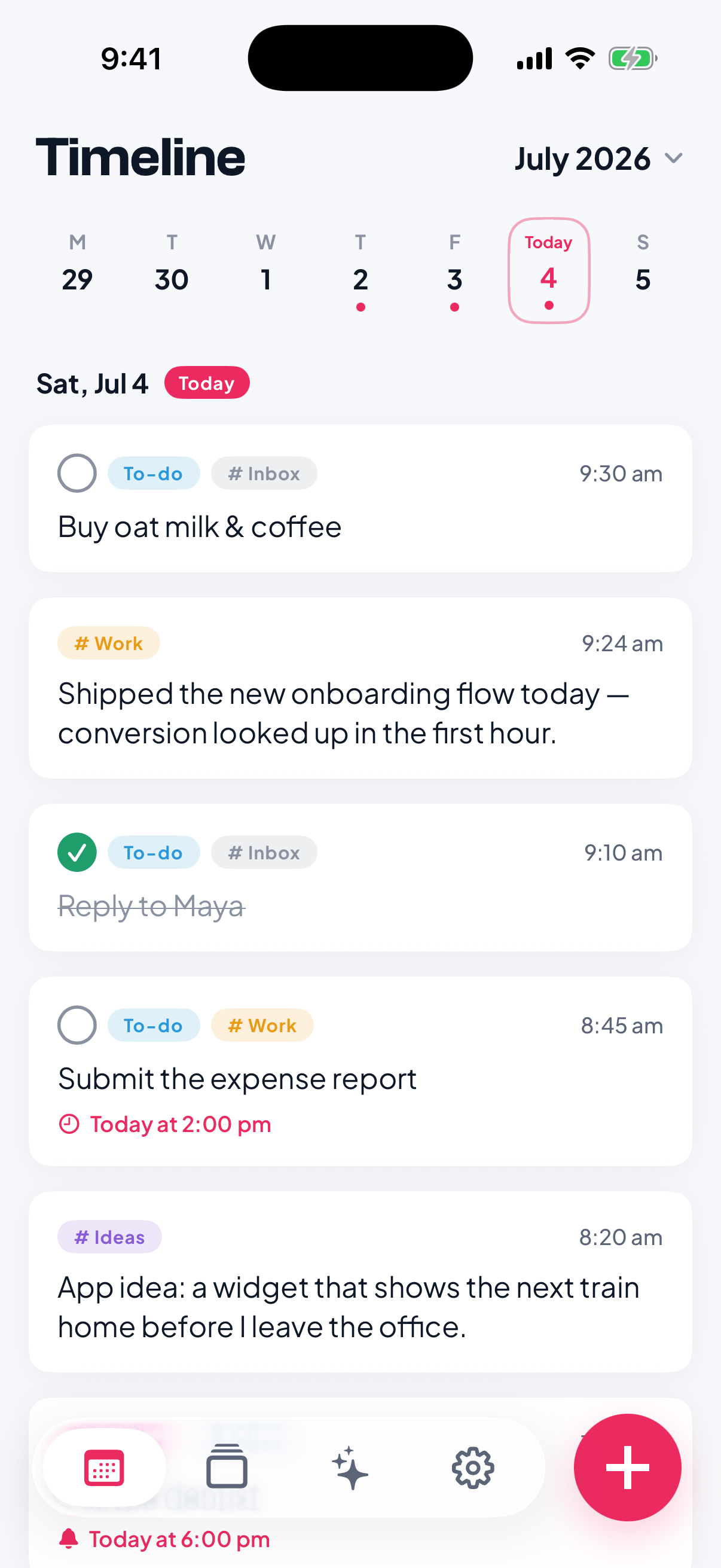
  • It files itself — transcribed, tagged, and dated on its own. No folders to keep up.
  • Reminders actually fire — “remind me to call Mom tomorrow 5pm” sets itself.
  • Answers with sources — ask in plain language and it searches everything you’ve saved, linking back to the exact notes.
  • Private by design — your notes live on your iPhone, not on our servers.

From this page 01Say it 02It files itself 03Ask it later

One quick habit, three ways it pays off.

01 Say it

Capture in one gesture

Talk or type the second a thought lands. Voice or keyboard, one simple box — every voice note or memo saved before it slips away.

One button does everything. Tap the plus button and the composer opens for typing. Press and hold it to record a voice note — a timer and live waveform appear while you speak. Slide up to lock the recording hands-free, then send. Your iPhone transcribes it and the note files itself: saying “remind me to call mom tomorrow 5pm” becomes the reminder “call mom tomorrow 5pm”, set for tomorrow at 5:00 PM.

02 It files itself

Tags, dates, reminders — automatic

No folders to keep up. Fly Notes transcribes what you said, tags and dates it for you, and turns “remind me Friday at 3” into a real reminder that fires even when the app is closed.

Example: typing “remind me to call mom tomorrow 5pm” creates a reminder for tomorrow at 5 PM; a shortcut like “r” at the start does the same; “work” files it under Work; “fri 9am” sets the date. A line with no type word, like “idea an app that tracks flights”, stays a note filed under Ideas.

03 Ask it later

Your notes, answerable

Find anything by just asking. Fly Notes searches everything you've saved and answers in plain language — with receipts: every answer links back to the exact notes it came from.

Capture, organizing, and search run on your iPhone. Ask sends your text to our AI providers (via OpenRouter) to answer it — zero-data-retention providers only. We tell you when, and we don't store it.

Example: asking “What gift ideas do I have for Dad?” returns the answer “Two ideas so far, both from things he let slip: a vinyl of the Coltrane album he kept playing in the car, and the new Murakami in hardcover — he’s finished the whole Bosch series.” Beneath the answer, “From your entries · 2 matches” expands to show the two source notes the answer came from; in the app, tapping a source opens that note.

Works everywhere you do

Capture without opening the app — from your wrist, your Lock Screen, or Siri.

One tap from your wrist

Put Fly Notes on your watch face. Tap, talk, drop your wrist — your iPhone turns it into a tagged, dated note. No phone nearby? Notes wait on your wrist and sync when it's back.

On the watch: the Fly Notes complication opens straight to the record button. Tap it and your watch records — a timer counts while you talk. Tap stop and the recording is sent to your iPhone, which transcribes it and files it as a tagged, dated note. No phone nearby? It waits safely on your watch and syncs when your phone is back in range.

  • Home Screen widgets

    Fly a note or ask without opening the app.

  • Lock Screen

    Capture before you even unlock.

  • Control Center

    Start a note from your controls.

  • Live Activity

    Watch it record, without unlocking.

  • Siri & Shortcuts

    Ask questions, build one-tap flows.

  • Apple Reminders

    Your reminders mirror across, automatically.

Straight answers.

The things people ask before they download it — answered plainly, no fine print.

Something we missed? support@flynotes.app

More answers

Is Fly Notes free?
Fly Notes is free to download, and capturing, filing, and searching your notes stay free. Ask comes with a free allowance; Fly Notes Pro raises the limits and adds iCloud sync, for $4.99 a month or $39.99 a year (US pricing — the App Store shows your local price).
Does the Apple Watch app need my iPhone?
Your watch records on its own, wherever you are. Your iPhone does the transcribing and filing — so if it isn't nearby, notes wait safely on your wrist and sync the moment it is.
Is Fly Notes a voice recorder or a note taker?
Both. Talk and it records, then transcribes your voice to text; type and it's a quick note. Either way Fly Notes tags, dates, and files it for you — and turns the right lines into reminders.
Can I ask questions across my old notes?
Yes — that's the whole idea. Ask in plain language and Fly Notes searches everything you've saved, then answers with links back to the exact notes. It's a second brain you can actually talk to.
Where do my notes live?
On your iPhone — not on our servers. When you use Ask, the text of that request goes through OpenRouter to an AI provider (currently Google Cloud, Groq, Together AI, or DeepInfra) to produce the answer. We only use providers that run under zero-data-retention terms; we tell you when, we don't store it, and it's never used to train anything.
Does Fly Notes work in my language?
Capture and type notes in any language. Search and Ask understand English out of the box, and an optional free download adds 14 more languages — Spanish, French, German, Italian, Portuguese, Dutch, Russian, Arabic, Hindi, Chinese, Japanese, Korean, Vietnamese, and Indonesian. It runs on your iPhone, so multilingual search stays as private as everything else.
Where can I get Fly Notes?
It's on the App Store now, free to download, for iPhone and Apple Watch. Android and a Mac app are next — leave your email at the bottom of this page and we'll tell you the day they land.

Start with the next thought.

Free to start — capturing, filing and searching your notes cost nothing.

Today

On your iPhone and Apple Watch.

No account needed · your notes stay on your device

Up next

Android and Mac are coming.

One email the day it lands — nothing else.

Which should we tell you about?