 Fly Notes
Where do your dictations go on a Mac?
3 min read
Apple Dictation puts text wherever your cursor is. Look for an email in Drafts or Sent, and for a paragraph in the document where you spoke it. A dictation app with a separate history gives you somewhere else to look when the original field disappears. In Fly Notes that history stays on the Mac until you choose to save a dictation as a note.
Where would you look for a sentence you typed yesterday?
Start there. An email you dictated into Mail has the same chance of being in Drafts as an email you typed into Mail. A form you filled out in a browser has whatever recovery the form offers. Apple’s Dictation guide describes entering text at the cursor. The place you put that cursor matters a lot once the window closes. Apple’s Dictation guide
Suppose a delivery company asks how to find your door. You dictate “The brass bell is broken. Come through the gate beside the bakery.” Three days later a different driver asks the same question. You can remember the bakery. Can you remember which company’s form you put it in?
This is where a history earns its space. One word you remember should be enough to get back the two sentences you do not want to write again.
What does a dictation history keep?
That depends on the app you were using when you spoke. Wispr Flow’s desktop guide, for example, describes searching transcripts from Home and copying an earlier entry. If you already use Flow, look there before installing anything else. Turning on another tool today cannot recover what you said yesterday. Wispr’s guide to transcript history
Granola also keeps a local dictation history. Its settings let you keep entries until you delete them (the default), delete them after 24 hours, or delete them immediately. Choose the last option and the next lost sentence really will depend on the app you put it in. Granola’s history and privacy guide
In Fly Notes, open Dictation on the Mac where you spoke. Search for bakery, open the matching take and copy the directions. Expanding a take lets you read what the app heard and, where cleanup changed it, what was typed. You can still tell whether “brass” went missing while the app was listening or while it was tidying the sentence. There is no recording to play back. Fly Notes for Mac
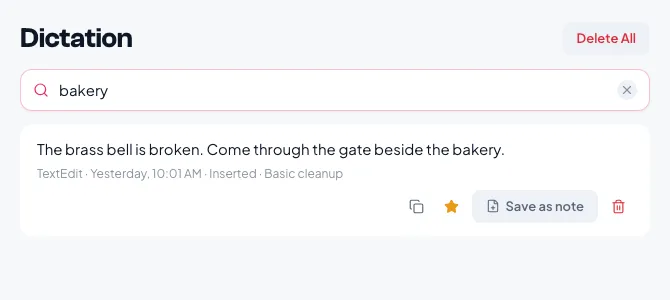
In this example, bakery finds the directions. The filled star keeps the take even if you later set history to expire. Save as note is the separate button beside it.
What is the difference between a star and a note?
A star is enough for the gate directions. Fly Notes keeps history until you delete it. If you set Keep history in Settings ▸ Dictation to 7, 30 or 90 days, older unstarred takes are removed and starred ones stay. You can also delete an individual take. A dictated message you considered temporary may have a copy here even after you clear the draft in Mail.
Save as note does something else. It puts the text in the notebook, where you can find it alongside things you captured on purpose. If you use Pro sync, the note can reach your iPhone. Ask can use saved notes when answering a question and uses a cloud model for the answer. It has no access to a take sitting only in Dictation history.
There is no need to promote every thank-you email to a permanent note. Keep the directions if you will need them at the gate. Leave “Thursday suits me too” where you sent it.
Fly Notes keeps dictation history on the Mac where you spoke. You choose how long it stays. Download for Mac (Apple silicon) · iPhone app
Related questions
- Can you play back a Fly Notes dictation?
- No. Dictation history keeps the words and discards the recording. Use an audio recorder when you want to hear the voice again.
- Can Ask find a sentence you dictated into another app?
- Only if you saved it into the Fly Notes notebook. Search the Dictation page on the original Mac for a take that still lives in history.
- Does starring a dictation sync it to iPhone?
- No. A star keeps the take on that Mac whatever history setting you choose. Save as note puts it in the notebook, where Pro sync can carry it to your iPhone.