 Fly Notes
How do you change the Mac dictation shortcut?
2 min read
To change the Mac dictation shortcut, go to System Settings › Keyboard › Dictation › Shortcut. Choose a listed shortcut or select Customize and press the keys you want. To turn Apple Dictation off altogether, use the Dictation switch in the same pane.
Where do you change the shortcut?
- Open System Settings › Keyboard and scroll to Dictation.
- Open Shortcut. Choose one of the listed combinations, or choose Customize and press the keys you want.
- Click in a new TextEdit document and try the shortcut. Try it again in the app where you usually write. If the shortcut opens an emoji picker, use Edit › Start Dictation in TextEdit to check that Dictation itself works.
On an Apple keyboard with a microphone key, tap it to start. If you use the globe key to switch languages, check Press globe key to after changing the Dictation shortcut. Some shortcut choices also change what that key does. Apple’s shortcut instructions
How do you turn off dictation on a Mac?
- Open System Settings › Keyboard › Dictation.
- Switch off Dictation to stop Apple Dictation. If you still want voice typing and only want your old shortcut back, change Shortcut instead.
- If a different app still opens its microphone, change the shortcut in that app’s settings.
Should you hold a key or tap it?
For a two-line reply, holding a key gives the sentence an obvious end. Your finger comes up when you finish speaking. For three paragraphs, keeping a finger pressed is an extra job, especially if you are reading from a piece of paper and need that hand to turn it over. Pressing once to start and again to finish makes more sense there.
Fly Notes defaults to holding right Option to dictate into the current app. Right Option needs Input Monitoring. Until it is on, Option–Shift–Space (⌥⇧Space) starts dictation. If another app has claimed that combination, the Dictation page explains the conflict. Accessibility is a separate permission that lets Fly Notes put text into the active field. Fly Notes Mac shortcuts
Try one reply with Hold to talk and one with Press to start and stop, under Dictation shortcut in Settings ▸ Shortcuts or Settings ▸ Dictation. If the final word gets clipped as you lift your finger, press mode may be easier. To check what the app caught, open Dictation and search for a word from the reply. How dictation history works
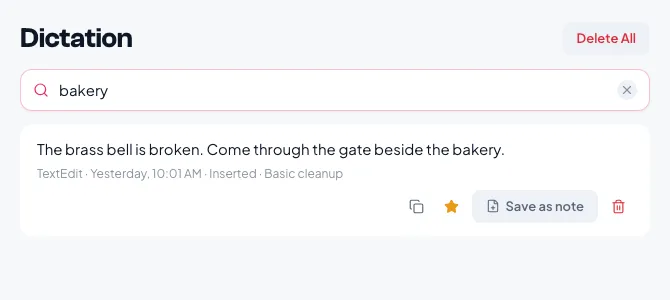
Fly Notes lets you choose a hold or a press for dictation on your Mac. Download for Mac (Apple silicon) · iPhone app
Related questions
- Why does holding the microphone key open Siri?
- On a supported Apple keyboard, a short press starts Dictation and a long press can call Siri. For Dictation, lift your finger before you start the sentence.
- Can you keep Dictation and change what Fn does?
- Yes. Check both the Dictation shortcut and the “Press fn key to” or globe-key setting after changing either one. Some choices change the other setting too.
- How do you stop halfway through a sentence?
- With Apple Dictation, press Escape. With Fly Notes in hold mode, release your dictation key. Read the words already entered before starting again.